Borrow Technology
Explore the many ways Richmond Hill Public Library is empowering members with the tools and resources they need to access and share information, while boosting their levels of creativity and productivity.
Computers and Printers
All of our branches offer a host of desktop computers (and free Wi-Fi) for use. Each computer is equipped with Microsoft Office, Firefox and Chrome, Adobe Acrobat Reader, GIMP, VLC, and PaperCut for printing.
Members can reserve computers for up to two hours per day. Express computers can be used for up to 30 minutes without a library card. All computer time can be extended at the discretion of our team.
Each computer is automatically reset and erased after every session. We recommend bringing a USB stick or connecting to a cloud storage service (i.e. Google Drive, Dropbox, etc.) for saving and managing data during your session.
Chromebooks
Chromebook laptops can be borrowed with a library membership for in-branch use at our Central, Oak Ridges, and Richmond Green locations. Visit the branch service desk to get started.
Early Literacy Stations
Designed for ages 2-8, Early Literacy Station computers offer fun, educational, and interactive content in seven curriculum areas: math, science and nature, social studies and geography, reading, art and music, writing and computer skills, and reference. Early Literacy Stations are available at all RHPL locations.
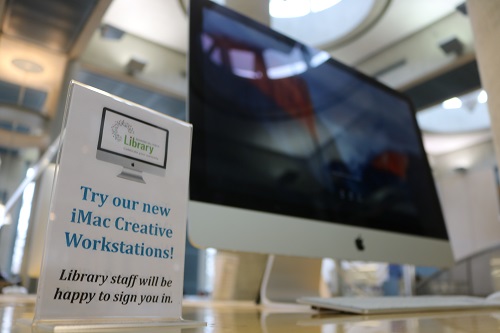
iMac Creative Workstations
Available at our Central, Oak Ridges, and Richmond Green branches, we offer iMac Creative Workstations to support digital creators of all ages. Each station is equipped with GarageBand, iMovie, and the Adobe Creative Suite.
Members can reserve iMacs for up to three hours per day, with the option to extend their time at the discretion of our team.
Please remember to save your work to a USB drive or a cloud-based service, such as Dropbox. Your data will be lost once the computer restarts.
Free Wi-Fi
We are happy to provide Wi-Fi free of charge. Wireless internet access is available at all our branches during library hours.
To connect to our network, select RHPL Public from the available Wi-Fi networks displayed on your device, launch a web browser and then click on the Accept button to the Internet Use Policy.
Printing, Scanning and Photocopying using an RHPL Copy Card
RHPL offers printing and photocopying at all locations. Purchase a Copy Card and add funds at any of our customer service desks. Learn more about copy cards.
You may also be interested in: Email to Print features.
| Cost per page | |
|---|---|
| Black and White | $.15 |
| Colour | $.40 |
| Scan | $.05 |